CDPlayer is started as every other GNUstep application, too.
It will try to find a playable audio CD in any of the configured
CD drives of your PC. If it has found one, the track list will
show the tracks and the main panel will look like in the picture
in section ["The main control panel"].
If all drives are empty, the main panel looks like this:
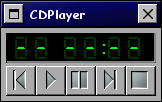
On startup you can supply the argument 'Device' containing the
path to your preferred CD drive, e.g. 'Device=/dev/cdrom'. This
drive will then be checked first for an audio CD.
CDPlayer.app (or rather AudioCD.bundle) will then continually
check the configured (see ["Configuration" for details])
for a change, i.e. it will detect itself if you remove the CD or
insert a new one.
CDPlayer.app's main control panel resembles the front panel of your
home stereo's CD player. Only, it is much simpler. Thus, it should be
easy to understand.
The track list is a list displaying the CD's tracks and their respective
length. The currently played track is printed in bold. The track list has
no further functionality. In particular it is not meant to be any kind
of a smart play list. It is just a dumb list.
Actually, there is one function you may find useful. You can select tracks
you wish to copy onto a CD, and drag them to Burn.app's CD description
window.
If you do have a connection to the internet, you may also do a query on a
FreeDB server to have the track titles displayed properly. This will work
only, if you have chosen a FreeDB server in CDPlayer.app's settings.